
FreeRDP and server-side kerberos
 Lately, I've been exploring topics related to FreeRDP with remote credential guard, Kerberos,
and NLA, so I'm writing this post on how Kerberos-ize FreeRDP server-side.
Lately, I've been exploring topics related to FreeRDP with remote credential guard, Kerberos,
and NLA, so I'm writing this post on how Kerberos-ize FreeRDP server-side.
NLA, SPNego and Kerberos

The whole Kerberos process starts with NLA: if you connect to an RDP server
with mstsc and the configuration is fairly standard,
when you run mstsc /v:dc.hardening2.com, mstsc will:
- connect to the server and negotiate NLA;
- establish the TLS layer;
- start NLA by sending a SPNego packet, and this SPNego packet will contain the start of a Kerberos packet in user2user mode in the optimistic token field. Basically, mstsc (via CredSSP) considers that we obviously support everything that works and in addition to providing the ordered list of authentication modes that we support, ir considers that we can save a round trip by directly providing a token for the one we prefer, because that is definitely the one the server will use;
- so in the standard case, this first token will be a request for tgt as part of a negotiation in kerberos user2user mode. This assumes that the server has a machine account that allows it to retrieve a TGT. The server acquires the TGT and sends it back to the client;
- In the next steps, the client sends a Service Ticket (often called TGS) for validation to the server.
This ticket is for
TERMSRV/<server name>@<REALM>. We are in user2user mode, so the server validates this ticket "through" the client.
Notes: in some cases, you can skip the SPNego layer entirely and send the appropriate message directly. This is what always does the venerable rdesktop, but FreeRDP also does that when you can only use NTLM or a type of Kerberos (in which case there is no need to add the SPNego negotiation layer).
Configuration
That's all well and good in theory, but what about in practice? Obviously, we can run commands in Windows and play around clicking buttons under windows, but that's not what we want, is it?
So instead, we're gonna use msktutil on Linux to create the right keytab. We start by logging into Kerberos with an account that has the right privileges, for example, in my case:
$ kinit Administrateur@HARDENING2.COM
Password for Administrateur@HARDENING2.COM:
$ klist
Ticket cache: FILE:/tmp/krb5cc_1000
Default principal: Administrateur@HARDENING2.COM

Valid starting       Expires              Service principal
08/12/2025 14:11:09  09/12/2025 00:11:09  krbtgt/HARDENING2.COM@HARDENING2.COM
        renew until 09/12/2025 14:10:49
Next, we will create the host djinn65, attach the TERMSRV service to it, and retrieve the corresponding keytab. In my example, the domain controller is called dc.hardening2.com:
$ msktutil --server dc.hardening2.com --precreate --host djinn65 -b cn=computers --service TERMSRV --description "host account for djinn65" --enctypes 24 -N
$ msktutil --server dc.hardening2.com --auto-update --keytab djinn65-termsrv.keytab --host djinn65 -N
$ klist -kt djinn65-termsrv.keytab
Keytab name: FILE:djinn65-termsrv.keytab
KVNO Timestamp           Principal
---- ------------------- ------------------------------------------------------
  15 05/12/2025 22:51:04 djinn65$@HARDENING2.COM
  15 05/12/2025 22:51:04 djinn65$@HARDENING2.COM
  15 05/12/2025 22:51:04 djinn65$@HARDENING2.COM
  15 05/12/2025 22:51:04 DJINN65$@HARDENING2.COM
  15 05/12/2025 22:51:04 DJINN65$@HARDENING2.COM
  15 05/12/2025 22:51:04 DJINN65$@HARDENING2.COM
  15 05/12/2025 22:51:04 TERMSRV/djinn65@HARDENING2.COM
  15 05/12/2025 22:51:05 TERMSRV/djinn65@HARDENING2.COM
  15 05/12/2025 22:51:05 TERMSRV/djinn65@HARDENING2.COM
  15 05/12/2025 22:51:05 host/djinn65@HARDENING2.COM
  15 05/12/2025 22:51:05 host/djinn65@HARDENING2.COM
  15 05/12/2025 22:51:05 host/djinn65@HARDENING2.COM
Note the entry associated with the machine with the dollar sign at the end (DJINN65$@HARDENING2.COM).
There are several ways to set a SPN. Either you create a "service account" and associate the SPN with it, in which case the service account's rights are applied.
Or, as in my example, the machine account holds the SPN rather than an additional service account. You can see this by using the "Active Directory Users and Computers" tool, go to the entry corresponding to the machine, then open the attribute editor tab, where you will find a servicePrincipalName entry:
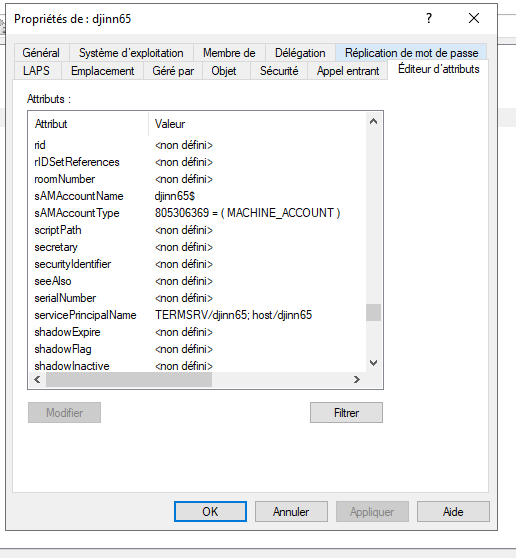
In the case of a service account, you'll have the same attribute set, but on the service account entry rather than on the host entry.
The difference between the two modes is that when the SPN is associated with the host, the server will “log in” (retrieve a TGT) with the SPN djinn65$@HARDENING2.COM.
We can simulate this by doing:
$ kinit -kt djinn65-termsrv.keytab 'djinn65$@HARDENING2.COM'
In the case of a service account, it rather be something like (BTW msktutil also allows to manage service accounts):
$ kinit -kt djinn65-termsrv.keytab TERMSRV/djinn65@HARDENING2.COM
Conclusion
After all that, Kerberos authentication has no secrets for you anymore. Time to run FreeRDP proxies or shadow servers in NLA+Kerberos!